Monthly Summary
Scope
At the "Monthly Summary" section at "Reports" you can find a report with the total monthly hours worked per employee for all the months of a given year in a hour (h) minute (m) format. For example: 12h56m (12 hours and 56 minutes).
Where to edit
At the left menu, click on "Reports" and then on "Monthly Summary".
Reports > Monthly Summary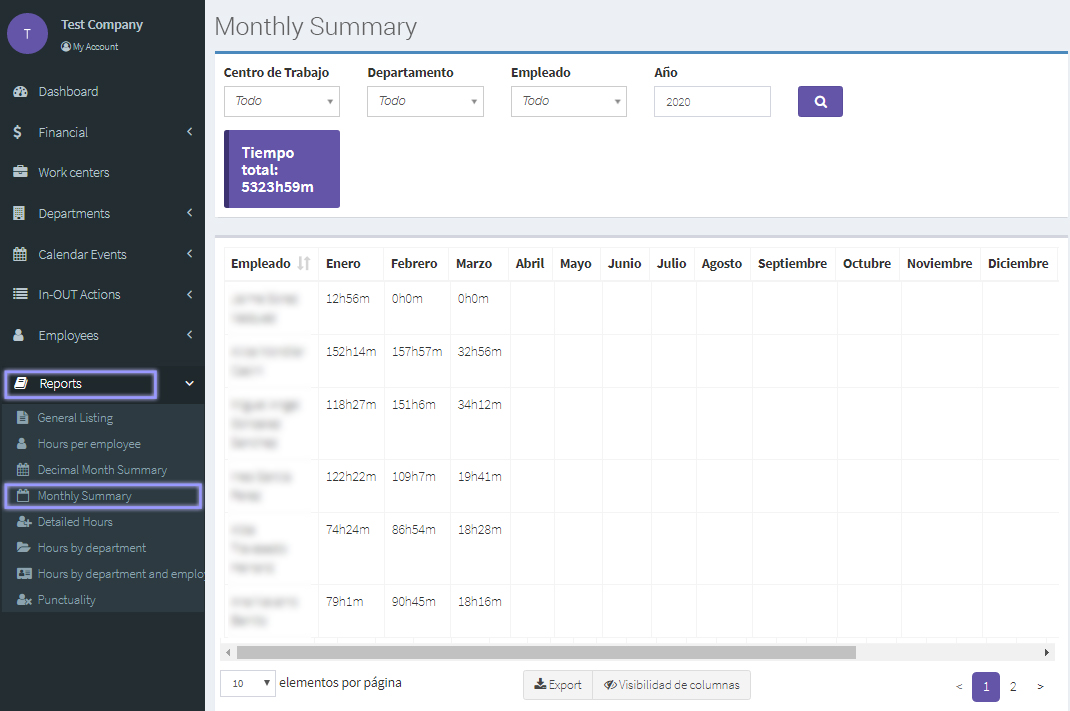
Advanced options for this report
Apply filters and search
To filter the results of a report, click on the desired field/s at the top of the report: work center, department, employe, and date range. The work centers, departments and employees that you have configured respectively, previously, will appear here to be selected from a drop list.
When you have finished selecting the filters you wish to apply to the search, click on the Search button with a magnifying icon.
Export the report
You can export the report at the bottom of the results page by clicking on the "Export" button. Available options include: "Copy data", "save as excel, csv or pdf formats", or "print".
Hide/Show fields
You can hide or show a column of the report at the bottom of the results page by clicking on the "Visibility of Columns" button.