Dashboard
Scope
At the "Dashboard" section you get a quick glimpse of the company's monthly calendar overview and a daily attendance overview.
Where to access
At the left menu, click on "Dashboard".
Dashboard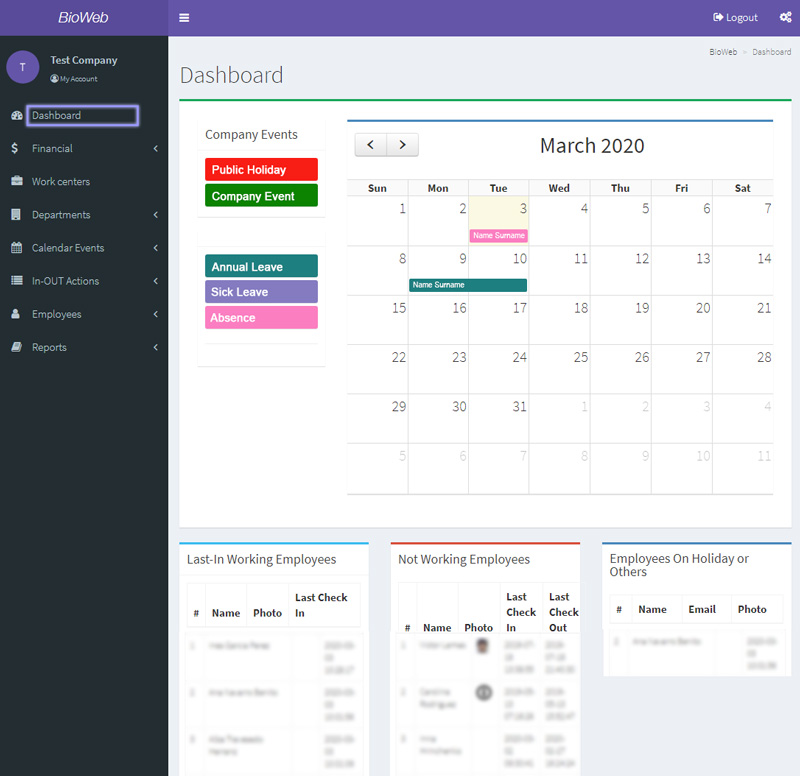
Monthly calendar overview
With a simple colour-coded calendar interface, you can see who is on leave, who is absent, and the public holidays and observances, by month.
Daily atttendance overview
The daily attendance overview shows:
- Last-In Working Employees: the current day's employees that have clocked in with the time of the track, updated in real time.
- Not Working Employees: list of employees that should have clocked in the current day (not on leave) but haven't yet clocked in, updated in real time.
- Employees On Holiday or Others: employees on leave the current day.